Accessing online videos often means dealing with various platforms and their specific players. For those seeking a unified and straightforward way to stream content directly from any web link, Url Video Player emerges as an essential Android application. This powerful tool provides a seamless gateway to play external video files from virtually any remote URL, offering unparalleled convenience without needing to download the content first.

Url Video Player
Tarek2web
Download
14.48 MB
Url Video Player Screenshots
1 / 2
14.48 MB
Size
4.0
Version
7+
Android
Universal
Arch
About Url Video Player
Accessing online videos often means dealing with various platforms and their specific players. For those seeking a unified and straightforward way to stream content directly from any web link, Url Video Player emerges as an essential Android application. This powerful tool provides a seamless gateway to play external video files from virtually any remote URL, offering unparalleled convenience without needing to download the content first.
Seamless Remote Playback
Accessing media from diverse online sources is simplified with this robust solution. Users can effortlessly input any video URL, whether it’s a direct link to an MP4, MOV, or other common video formats hosted on a server, and begin playback instantly. This eliminates the need for separate streaming apps or browser tabs, consolidating all your external video viewing into one convenient place. It’s designed for quick, direct access to your desired content.
Organize Your Links
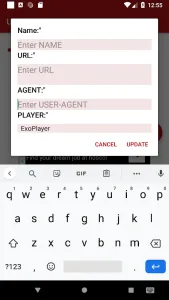
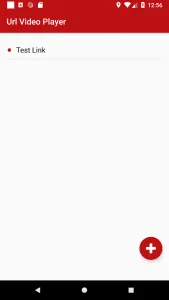
Beyond simple playback, the application empowers users to maintain a personalized library of their favorite video links. You can easily save any URL you’ve played, building a curated list that’s always at your fingertips. The editing functionality allows for quick modifications, ensuring your list remains tidy and up-to-date, reflecting your current viewing preferences without hassle. This feature is invaluable for recurring content or a personal watchlist.
Effortless Sharing Integration
This tool integrates smoothly with the Android ecosystem, allowing for incredibly quick access to video content. If you encounter a video link on a webpage or within another application, you can simply use the standard Share function. Selecting Url Video Player from the sharing options will instantly open and play the video, bypassing cumbersome copy-pasting. This seamless workflow makes discovering and watching new content exceptionally convenient.
Intuitive Viewing Controls
Optimizing your viewing environment is made simple with built-in controls. The experience offers direct access to adjust screen brightness right within the player interface. This means you won’t need to exit the app or navigate through device settings to adapt to different lighting conditions. Whether you’re watching in a dimly lit room or bright daylight, a quick swipe or tap ensures comfortable viewing.
Flexible Display Options
To further enhance your playback, this player provides flexible display settings. You can effortlessly manage the aspect ratio, ensuring videos are shown correctly without stretching or cropping, regardless of their original format. Furthermore, the ability to control screen rotation means you can lock it to portrait or landscape, or allow automatic rotation, tailoring the display precisely to your preference and the content you’re watching.
Streamlined User Interface
Navigating through your videos and settings is remarkably straightforward thanks to the platform’s clean and intuitive design. Every feature is placed logically, ensuring that even first-time users can quickly grasp how to play videos, manage their lists, and adjust playback settings. This focus on user experience minimizes friction, allowing you to spend more time enjoying your content and less time figuring out controls.
Frequently Asked Questions
Yes, Url Video Player is available completely free of charge. Users can enjoy all its core functionalities, including playing remote video files and managing their lists, without any subscription fees.
Absolutely. The application allows you to easily save any video URL you play to a personalized list. You can also edit this list, adding new links or removing old ones, to keep your content organized.
This player is designed to handle external video files from virtually any remote URL. This includes direct links to video files (like .mp4, .mov) hosted on various web servers, making it highly versatile for diverse online content.
The tool provides convenient in-app controls for display brightness, aspect ratio
Additional APP Information
Package Name
info.t4w.vp
Developer
Tarek2web
Category
Signature
9049e99c75b579763c62723af0af2c55b6ffa39c
Get it On

You are now ready to download Url Video Player for free. Here are some notes:
- Please read our APK Info and installation instructions carefully for the game & app to work properly
- Read the FAQ carefully for more details
4.7/5 (21 votes)